![[OCI] Re-create the PDB$SEED](https://cdn.hashnode.com/uploads/covers/65605419d28f19cc44df7ef1/f28aba81-36b0-4055-964d-5703b33b565b.webp)
Today, let's talk about how to easily re-create the PDB$Seed when we don't have a backup.
Below you can see the error:
sys@> alter pluggable database PDB$SEED open read only;
alter pluggable database PDB$SEED open read only
*
ERROR en lÝnea 1:
ORA-01173: el diccionario de datos indica que falta un archivo datos del tablespace SYSTEM
We need to follow steps get everithyng working properly.
Drop the PDB$Seed.
Create the empty PDB in another CDB$Root.
Re-create the PDB$Seed based on the PDB created the previous step.
So, let's crack on and get our hands dirty!
1.- Drop the PDB$Seed
Just to be clear, if you try to drop the PDB at this point, you will receive the following error:
sys@OSIALEPR>  drop pluggable database "pdb$seed" including datafiles;
 drop pluggable database "pdb$seed" including datafiles
                         *
ERROR en lÝnea 1:
ORA-65017: la base de datos de conexi¾n inicial no se puede borrar ni modificar
First of all, let's set "_oracle_script" parameter.
Bellow, you can see the sequence of steps that I followed to drop it
sys@> alter session set "_oracle_script"=true;
sys@> alter pluggable database "pdb$seed" close;
sys@> drop pluggable database "pdb$seed" including datafiles;
sys@> show pdbs

    CON_ID CON_NAME    OPEN MODE  RESTRICTED
---------- ----------- ---------- ----------
         3 PDB1        READ WRITE NO

SQL> alter session set "_oracle_script"=false;
2.- Prerequisites for clonning the PDB
Let's set up another PDB in different machine.
At this point, we have two machines. One the one hand, the source machine, where we need to re-create the PDB. On the other hand, the clone machine, where we set up a PDB that we will be used to achieve our goal.
Below, our model in this laboraty
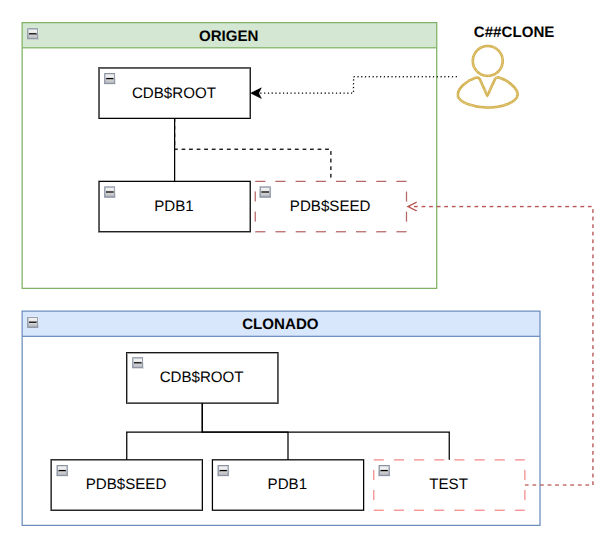
Let's set up our common user, C##CLONE, on the source machine.
SQL> CREATE USER C##CLONE IDENTIFIED BY "XXXXX";
SQL> GRANT CONNECT, RESOURCE, DBA, SYSOPER, CREATE PLUGGABLE DATABASE TO C##CLONE CONTAINER=ALL;
Let's set up a new pdb called TEST on the clone machine.
SQL> create pluggable database TEST admin user pdb_admin identified by oracle;
SQL> alter pluggable database TEST open;
SQL> alter pluggable database TEST close;
SQL> alter pluggable database TEST open read only;
After updating the tnsnames file to include the new connection, let's set up the DBLink on the source machine.
SQL> CREATE DATABASE LINK REMOTE_SEED_LINK CONNECT TO C##CLONE IDENTIFIED BY "XXXXXX" using 'CLONADO';
At this moment, we're ready to re-create our PDB$Seed.
Re-create the PDB$Seed
After creating the DBLink, let's clone TEST pdb and name the new PDB PDB$Seed.
SQL> CREATE PLUGGABLE DATABASE "PDB$SEED" FROM TEST@REMOTE_SEED_LINK;
Let's check that the PDB$Seed is available on the source machine.
sys@> show pdbs

    CON_ID CON_NAME    OPEN MODE  RESTRICTED
---------- ----------- ---------- ----------
         2 PDB$SEED    MOUNTED
         3 PDB1        READ WRITE NO
All right. Lastly, let's open our PDB in READ ONLY mode.
SQL> alter session set "_oracle_script"=true;
Session altered.

SQL> alter pluggable database PDB$SEED open read write;
Pluggable database altered.

SQL> alter pluggable database PDB$SEED close;
Pluggable database altered.

SQL> alter pluggable database PDB$SEED open read only;
Pluggable database altered.

SQL> alter session set "_oracle_script"=false;
Session altered.
Let's check once again:
sys@> show pdbs

    CON_ID CON_NAME    OPEN MODE  RESTRICTED
---------- ----------- ---------- ----------
         2 PDB$SEED    READ ONLY  YES
         3 PDB1        READ WRITE NO
The PDB$Seed has an issue when we try to open it. Let's check PDB_PLUG_IN_VIOLATIONS view to find out what has happened:
sys@>
 Select Name, Cause, Type, Message, Status From Pdb_Plug_In_Violations Where  Status != 'RESOLVED' And Type='ERROR' Order By Name;

The issue is clear, we need to run the datapatch process to fix it.
[oracle@~]$ $ORACLE_HOME/OPatch/datapatch -verbose
After running it, we need to check that the issue has been fixed:
SQL>
select type, cause, message,CON_ID
from PDB_PLUG_IN_VIOLATIONS
where status != 'RESOLVED';

no rows selected
The output is clean,so let's open the PDB$Seed pdb in READ ONLY mode.
SQL> alter session set container=PDB$SEED;

Session altered.

SQL> alter session set "_oracle_script"=TRUE;

Session altered.

SQL> alter pluggable database PDB$SEED  close immediate instances=all;

Pluggable database altered.

SQL>  alter pluggable database  PDB$SEED OPEN READ ONLY;

Pluggable database altered.

SQL>  alter session set "_oracle_script"=false;

Session altered.
Let's verify once again:
sys@> show pdbs

    CON_ID CON_NAME    OPEN MODE  RESTRICTED
---------- ----------- ---------- ----------
         2 PDB$SEED    READ ONLY  NO
         3 PDB1        READ WRITE NO
I look forward to seeing you in the next article!
About the author
Ingeniero informático, Oracle ACE, DBA y Arquitecto OCI, con más de 15 años de experiencia en plataformas Oracle. Certificado en OCI Certified Architect Professional y OCI Migration and Integration Certified Professional.
Comments
Join the discussionNo comments yet. Be the first to comment.


